



Remarketing is a marketing strategy that allows companies to reach users who have previously visited their website or engaged with their online content. It is a powerful tool in Google Ads campaigns that enables re-engagement, increases conversions, and boosts brand awareness. In this article, you will learn what remarketing and dynamic remarketing are and how to effectively use them in campaigns Google Ads.
What is remarketing?
Definition
Remarketing is a form of online marketing that involves reaching users who have already had contact with your website or product. Its purpose is to remind them of your offer, persuade them to make a purchase, or encourage them to take other desired actions, such as signing up for a newsletter or downloading a free resource.
How does remarketing work?
The essence of remarketing is to enable a personalized approach to users based on their previous online behavior. In practice, this means displaying ads on websites, mobile apps, or social media platforms. These ads are tailored to the user’s interests and needs, increasing the chances of conversion.
How to apply remarketing in Google Ads campaigns?
Google Ads is one of the most popular advertising platforms that offers advanced remarketing tools. Here are the steps you need to take to effectively use remarketing in your Google Ads campaigns:
- Install the remarketing tracking code on your website: The first step is to install a special tracking code on your website. This code allows Google to identify users who have visited your site. If you are not comfortable implementing a dedicated code, you can also use remarketing audiences in Google Analytics 4.
You can find detailed instructions on how to implement the tracking code on your website HERE.
- Define target audiences: Now you can define the target groups, that is, the segments of users you want to reach. This can be done in various ways, such as based on specific pages visited by users or actions taken on your site.
- Create appropriate ads: Tailor your ads for each target group. Remarketing ads should be more personalized and encouraging, prompting users to return to your website. You can use attractive offers, promotions, or content related to the user’s previous activities on your site.
- Set your budget and define your strategy: Choose a budget that suits your financial capabilities.
- Measure the results: Google Ads remarketing provides tools to track campaign performance. Monitor metrics such as click-through rate (CTR), cost per click (CPC), conversions, and return on investment (ROI).

Advertising targeting in online campaigns – a comprehensive guide
Dynamic remarketing – definition
Dynamic remarketing is an advanced marketing strategy that allows you to personalize ads based on users’ previous interactions with your website or app. The main idea is to display ads containing specific products or services that the user has already viewed. This is an effective way to re-engage users by personalizing content to boost conversions.
Differences between traditional and dynamic remarketing
Ad content personalization:
Traditional Remarketing: Provides generic, “static” ads based solely on the fact that the user visited a particular site.
Dynamic Remarketing: Automatically adjusts ad content to the specific products or services the user viewed, thereby increasing ad effectiveness.
Campaign scaling:
Traditional Remarketing: Is more limited in scaling, especially when dealing with a large range of products.
Dynamic Remarketing: Scales ads across your entire product range, allowing you to reach diverse target groups.
Process automation:
Traditional Remarketing: Requires manually specifying which products or services to promote.
Dynamic Remarketing: Utilizes automation to dynamically select products from a data feed, simplifying campaign management.
Dynamic remarketing setup
You already know that dynamic remarketing is essential for your business and you’re ready to implement it in your campaigns. Where do you start? How do you set it up? First, decide whether the configuration will be on your website or within an app. Once that’s determined, our guide will tell you what to do next!
Setting up dynamic remarketing on your website
- Determine the type of business activity
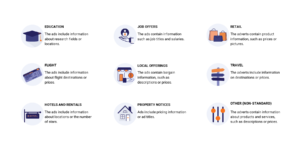
Properly matching your business type is crucial as it affects many later aspects of your campaign, such as the type of data feed, custom parameters, or ad layouts. You can choose from 9 ready-made options:
- If your business is in retail – link your Google Ads and Google Merchant Center accounts
- Log in to Google Merchant Center.
- Click the gear icon, then “Settings and Tools”.
- Select “Apps”.
- In the “Google Apps” section, click “Add Google Ads”.
- Enter your Google Ads account ID and click “Add”.
- Log in to your Google Ads account and accept the account linking request.
- If your email is already associated with your Google Ads account, simply choose it from the list and click the “Link” button.
You can find a more detailed guide HERE. - Create a new campaign
The business type you selected earlier will be applied to the new campaign. At this stage, you need to define basic settings, such as:- Goals: choose “Sales”;
- Campaign type: select “Display Network”;
- Subtype: check “Standard Display Campaign”;
- Campaign name;
- Campaign location;
- Bidding strategy;
- Budget;
- Additional settings: select “Dynamic Ads”, then “Use a data feed to create personalized ads”;
- Data feed: upload your data feed and an additional file if available;
- Ad group name;
- Audiences;
- From the “Select Category” menu: choose “Remarketing Lists”;
- Ad group bid.
- Add the Google tag and event snippet to your website
The Google tag must be on every page of your site, while the event snippet should be placed only on pages where events occur. Implementing the tag allows you to create data segments based on associating users with the product IDs they have viewed.HERE you can find the full instructions for adding the Google tag and event snippet. - If you did not do so during campaign creation – create flexible display ads.
For dynamic remarketing, you must link the ad group to your data feed. Then add images, headlines, ad texts, your company name, and the final URL. Optionally, you can also add URL tracking parameters, custom parameters, or CTAs.
Benefits of using remarketing in Google Ads
Remarketing in Google Ads offers many benefits, including:
- Increased conversion rates: By reaching users who have already interacted with your brand, you increase the chances of conversion, which means more sales and potentially higher profits.
- Enhanced brand awareness: Remarketing helps remind users who are already familiar with your brand, building and reinforcing brand recognition.
- Precise audience targeting: With various remarketing lists, you can tailor your ad content to specific user groups, increasing campaign effectiveness.
- Lower costs: Remarketing often results in lower advertising costs than traditional campaigns because it targets a more engaged audience.
Want to start using remarketing in your online campaigns?
As of 2024, the use of Consent Mode v2 has become mandatory. To run remarketing legally, you need to ensure its proper implementation. Not sure how to do it?
Summary
Remarketing is a powerful tool that allows you to reach users interested in your offer. Effectively using remarketing in Google Ads campaigns requires proper preparation, personalized ad creation, and continuous performance monitoring. With remarketing, you can increase conversions, boost brand awareness, and efficiently utilize your advertising budget. However, always ensure compliance with user privacy regulations and tailor your ads to meet their needs and interests.
If you feel that remarketing is right for you and you would like to implement it in your marketing strategy but don’t know where to start – trust the specialists. As WP Care, we hold the status of an official Google Partner, ensuring the high quality of our services. We can set up your campaigns or audit your existing ones.
Contact us, and we will definitely help you!





















































