



In today’s world, where competition in online business is becoming increasingly fierce, ads are an indispensable element of a marketing strategy. The key task of every advertising campaign is to reach the right target audience and deliver an appropriate message. The proper selection of ad elements is therefore crucial for achieving success. In the article below, we will introduce the Google Ads ad elements you must not forget.
Which Google Ads elements must you not omit?
Ad display locations
Definition
Ad display locations are platforms, websites, or specific areas on websites where ads are presented. These can include search results, partner sites, mobile applications, and sites within the Google Display Network.
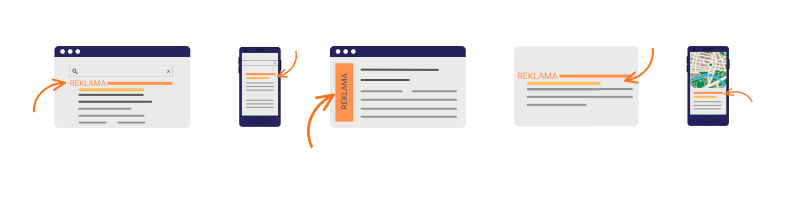
Examples of ad display locations
Google Search: Ads are displayed in search results on Google’s homepage when users enter specific queries.
Google Display Network: This is a network of websites, mobile apps, and other partner platforms where ads can appear in various formats, such as display banners, text ads, or video ads.
YouTube: Video ads can also be shown on YouTube, including ads before videos or ads displayed alongside videos.
Mobile app ads: Ads can be displayed within mobile apps on Android and iOS devices.
Google Maps: Local ads can be displayed in the Google Maps app when users search for locations.
Gmail: Text ads may be shown in the inboxes of Gmail users.
Ads on partner sites: Google Ads also allows ads to be displayed on partner websites and apps.
These are just a few examples of ad display locations in Google Ads. The selection of appropriate placements depends on your marketing strategy and campaign objectives. Google Ads offers numerous targeting options, allowing you to tailor your ads to specific audiences and placements, which helps increase campaign effectiveness.
How to customize ad display locations
- Align with campaign goals:
- If the goal is to increase brand awareness, consider ads on social media.
- Campaigns aimed at boosting sales might focus on search result ads.
- Match your target audience:
- Analyze demographic data and the preferences of potential customers.
- Utilize geographic data for local campaigns.
- Use remarketing to target users who have already shown interest in your product or service.
- Ad targeting:
- Utilize keyword targeting.
- Apply topic-based targeting related to website content.
- Use behavior-based targeting.
- Monitor and optimize campaigns:
- Regularly analyze campaign results.
- Test different placements (A/B testing).
- Optimize based on the results – disable underperforming placements.
Why is the right selection of ad display locations so important?
- Positive reception:
Selecting the right placement ensures the ad fits contextually, increasing its relevance for the target audience. Ads shown in appropriate settings are more likely to capture attention and generate positive reactions. - Ad budget efficiency:
Choosing suitable placements maximizes your return on investment. Investing in locations with a higher concentration of potential customers enables better budget management and improved results. - Delivering ads to the right audience:
Proper placement selection helps you target your specific target audience, avoiding wasted impressions for users unlikely to be interested. - Optimizing conversions:
The effectiveness of ads greatly depends on where they are displayed. Ads presented on pages or in contexts relevant to the product or service are more likely to yield higher conversion rates. - Better understanding of audience preferences:
Analyzing which placements yield the best results provides insights into audience preferences and habits, enabling you to adjust your marketing strategy accordingly. - Enhanced remarketing effectiveness:
Proper placement is crucial for remarketing campaigns targeting users who have previously interacted with your brand. - Minimizing the risk of negative reception:
Careful selection of ad placements helps avoid contexts that could damage your brand image by ensuring that ads are not shown in unsuitable environments.
CTA
Definition
CTA, or Call To Action, is a key element in online advertising, including Google Ads. It is an invitation aimed at persuading users to take a specific action, such as clicking the ad, signing up for a newsletter, filling out a form, making a purchase, or taking advantage of an offer. An effective CTA can significantly improve campaign results by increasing conversions and return on investment.
How to use CTAs?
-
- Select the appropriate message: The choice of CTA depends on the campaign goal. For instance, if the goal is product sales, an appropriate CTA might be “Buy Now” or “Add to Cart“. If collecting contact information is the objective, the CTA might be “Sign Up” or “Fill Out the Form“. It is important to align the CTA with the user’s intent.
- Place the CTA within the ad content: The CTA should be clearly visible and easy to notice, often placed in the ad headline. Use clear language and compelling words to encourage users to act.
- Personalize the CTA: Personalizing the CTA can enhance its effectiveness. Tailor it to your target audience and context. For example, if you are advertising garden furniture, the CTA could be “Find Your Perfect Garden Furniture.”
- Utilize ad extensions: Google Ads offers various ad extensions that allow you to add extra information and CTAs to your ad, thereby boosting campaign performance.
- Test different CTAs: A/B testing different CTA versions can help determine the most effective option. Compare different variants, analyze the results, and adjust your CTAs accordingly.
- Optimize the landing page: The CTA in the ad is just the beginning. It is crucial that the landing page aligns with the ad’s promise and facilitates the desired action. Ensure that the landing page is responsive and easy to navigate.
More information on landing page optimization can be found HERE.
- Monitor results: Regularly track campaign performance, including click-through rates (CTR) and conversions. This data will help you refine your CTAs to achieve better results.
Ad extensions
Definition
Google Ads ad extensions are additional pieces of information or elements that can be added to a standard text ad. They are displayed alongside the ad and aim to provide potential customers with extra details. There are many types of ad extensions, each of which can be tailored to specific advertising objectives.
Types of ad extensions
- Sitelink extensions: These allow you to add direct links to various sections of your website, making it easier for users to find the information they seek.
- Image extensions: These enable you to include an image. The image must be rectangular or square and of high quality. It should not include logos or text overlays.
- Callout extensions: These highlight specific features of your business that may further entice the user, such as free shipping or 24/7 customer service.
- Structured snippet extensions: These draw attention to particular features of your products or services.
- Call extensions: These allow you to add a phone number that users can call directly from the ad, potentially increasing phone inquiries.
- Location extensions: These display information about your business location, such as address or proximity to the user, which is particularly useful for local businesses.
- Price extensions: These allow you to add price cards that redirect users directly to a dedicated product page.
- App extensions: These facilitate the download of your mobile app directly from the ad through a clickable link.
How do ad extensions affect ad effectiveness?
Google Ads ad extensions have a significant impact on ad performance and offer many benefits. Here are some examples of how ad extensions can improve results:
- Increased click-through rates: Ad extensions can attract user attention and encourage them to click the ad. For example, sitelink extensions display multiple links, increasing the likelihood of a click.
- Providing additional information: Information and callout extensions offer potential customers valuable details that may help persuade them to take action.
- Enhancing local reach: Location extensions are extremely useful for local businesses. Displaying location information in an ad can help attract nearby customers.
- Improving campaign performance: The benefits of ad extensions extend beyond increased click-through rates; they can also enhance overall campaign quality scores, leading to lower cost per click and better ad positions in search results.

Advertising targeting in online campaigns – a comprehensive guide
Summary
Effective online marketing requires not only attractive ads but also a precise selection of the elements they contain. Understanding the various components, aligning them with your business goals, and systematically analyzing the results are key to the success of paid advertising. Be flexible, test different strategies, and monitor your metrics to achieve optimal outcomes.
If you’re unsure how to choose and configure the elements of your ads or if they aren’t delivering the desired results – trust the specialists. As WP Care, we hold the status of an official Google Partner, ensuring the high quality of our services. We will audit your campaigns and suggest the necessary changes. And if you don’t have time to implement these changes, we’ll do it for you!
Contact us, and we will definitely help you!





















































