



Tracking user behavior on websites has become an essential component of an effective online strategy. This is important not only from the perspective of digital marketing but also for analyzing your business data. However, managing tags and tracking codes can be complex, time-consuming, and requires technical knowledge. This is exactly where the hero of our article—Google Tag Manager (GTM)—comes in. It’s a tool that will significantly simplify your work as a marketer, website owner, or data analyst.

Google Tag Manager – what is it?
Definition of Google Tag Manager
Google Tag Manager (GTM) is a tool designed to simplify tag management on websites. As the name suggests, it’s a centralized platform for managing your tags collectively. Tags are short code snippets or scripts used to collect data on user behavior on your website. With GTM, you can add, edit, and remove tags without needing to modify the website’s source code directly. If you’re not familiar with web programming, Google Tag Manager offers a convenient alternative.
Role of GTM in tracking and data analysis
Google Tag Manager helps you with:
- Conversion tracking: GTM enables you to track user actions such as purchases, registrations, or form submissions, providing crucial insights into the effectiveness of your marketing efforts.
- User behavior tracking: GTM records various user behaviors like clicks, page scrolling, or content views, helping you understand what interests your site visitors the most.
- Remarketing: This tool also allows you to track visitors who haven’t completed conversions, providing valuable data for remarketing campaigns.

Remarketing and dynamic remarketing in Google Ads
Why should you use Google Tag Manager?
- Ease of tag management: Manage tags without coding, saving time and reducing errors.
- User-friendly interface: Intuitive interface suitable even for non-programmers.
- Quick implementation: Instantly implement changes without developer intervention.
- Support for multiple tags: Compatible with analytics (e.g., Google Analytics), ads (e.g., Google Ads), remarketing, and custom tags.
- Enhanced conversion tracking: Precisely track conversions for better marketing decisions.
- Access control: Easily grant different access levels to your GTM account, facilitating teamwork and collaboration.
- Scalability: Suitable for businesses of all sizes, from small firms to large corporations.
- Version management: Create and manage container versions for easier control.
How does Google Tag Manager work?
Google Tag Manager acts as a mediator between your website and various marketing and analytics tools, enabling structured and efficient tag management.
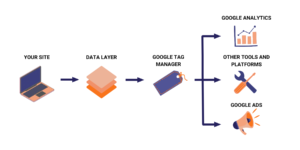
Replacing multiple tags with a single container tag
Instead of adding multiple tags directly to your site’s source code, GTM uses a single container tag to manage them, simplifying management, speeding up updates, and minimizing errors.
Tags, triggers, and variables – components of GTM
Tags: Code snippets that send data to tools like Google Analytics or Google Ads.
Triggers: Define when tags activate, such as clicks or page views.
Variables: Placeholders that store data values like product names or prices.
Data layer: Temporarily stores data to pass information between tags, triggers, and variables.
How to configure Google Tag Manager?
Step-by-step guide
- Create a GTM account: Visit Google Tag Manager, create an account, and enter details like account name and country.
- Create a container: Enter a container name and select its type. Click “Create” and accept the terms of service.
- Add container to your website: Copy the provided GTM snippets into your site’s HTML—place the script tag in the <head> section and the <noscript> tag immediately after the <body> opening.
- Add tags: Click “Tags” in GTM, then “New.” Configure and name your tag as needed.
Detailed instructions for Google Tags are available HERE.
- Create triggers: Set conditions for activating tags, such as page views or clicks.
- Publish changes: After configuring tags and triggers, click “Publish” to apply all changes live.
- Create variables: Optionally configure variables in the “Variables” section for data collection.
- Testing: Test tags using GTM debug tools or extensions like Google Tag Assistant.
Summary
Using Google Tag Manager helps optimize website performance, marketing campaigns, and user understanding. GTM saves time and improves your analytics, making it essential for digital marketing strategies.
If you’re overwhelmed by tags and triggers, trust WP Care, an official Google Partner, to audit and optimize your setup.
Contact us—we’re here to help!
Check our offer





















































