



Since the Gutenberg editor began to take shape (roughly from June 2017, when it was released as a plugin), opinions about it have been divided. Some users fell in love with it for its revolutionary approach to content creation. Others expressed skepticism about its contribution to the development of the WordPress platform. However, work on Gutenberg continued, and after many unfulfilled promises, it finally appeared at the end of 2018. What can we say about it 3 months after its official launch?
What is WordPress Gutenberg?
At the very beginning, it is worth clarifying exactly what Gutenberg is. Despite the existence of a group of advanced users who follow the project’s progress with bated breath, a large portion of WordPress users have only a rather vague idea of Gutenberg’s principles. This state of affairs can be blamed on the scant information available about it, which is basically limited to a short note in the WordPress dashboard. So, if you’re not sure what Gutenberg is all about, we’re here to explain!
Let’s start by clarifying that the Gutenberg project we discuss should not be confused with the Gutenberg Project (aimed at digitizing printed books). WordPress Gutenberg is a new content editor, available on the platform since the update marked with version 5.0. So why did its introduction stir up so many emotions?
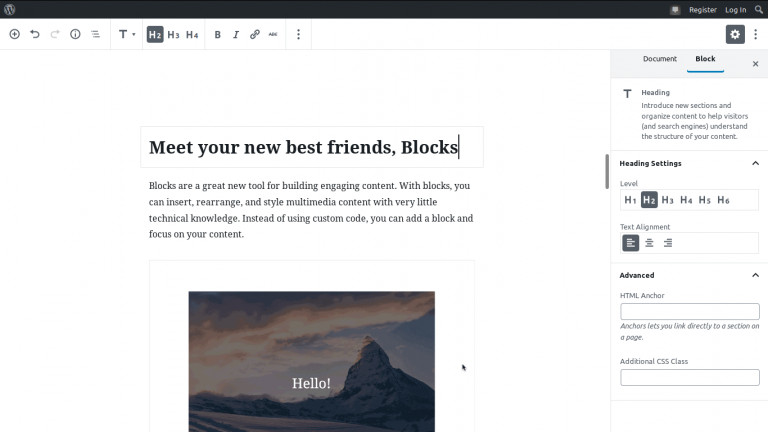
The new editor completely changed the approach to creating content on WordPress. In Gutenberg, content creation is based on blocks. A content block can be almost anything – a paragraph of text, any heading, embedded elements (e.g. videos from an external site), images, buttons, lists, or files. The sections added in this way can be modified freely, thanks to the introduced “drag and drop” functionality and extensive styling options. Another novelty is that all changes can be viewed and saved on the fly.
A breakthrough in Gutenberg was also the choice of technology. Until now, plugins and themes for WordPress were based solely on PHP. The new editor was built entirely using JavaScript, specifically the React library.
In light of these revelations, the announcement of integrating the Gutenberg editor into the core of WordPress sparked considerable controversy. The community gathered around the project feared, among other things, the emergence of two camps of developers (those coding only in PHP and those coding in both PHP and JavaScript) as well as the loss of potential revenue streams.
Why was the Gutenberg editor created?
WordPress Gutenberg was created to revolutionize content building in WordPress. Its name comes from Johannes Gutenberg, who completely transformed the face of printing. The solutions implemented in the editor were meant to be simpler, more intuitive, and more user-friendly, especially for newcomers and those who lack extensive knowledge of HTML and CSS. WordPress as a whole was also expected to benefit, as the introduced changes would simplify the creation of engaging content rich in images, videos, or tables. These were the official reasons behind its introduction.
Unofficially, however, it is said that the editor was created so that WordPress could finally compete with platforms such as Wix or Weebly, where you can build your website entirely from scratch. There were also voices claiming that the changes (block layout and the use of JavaScript) indicate that WordPress is moving towards a software-as-a-service model.
Regardless of the creators’ intentions, the very idea of a more convenient and simpler user experience sounds appealing. Apparently, though, these arguments (or perhaps something entirely different) did not convince users, who did not hold back their criticism in reviews. So, what went wrong?
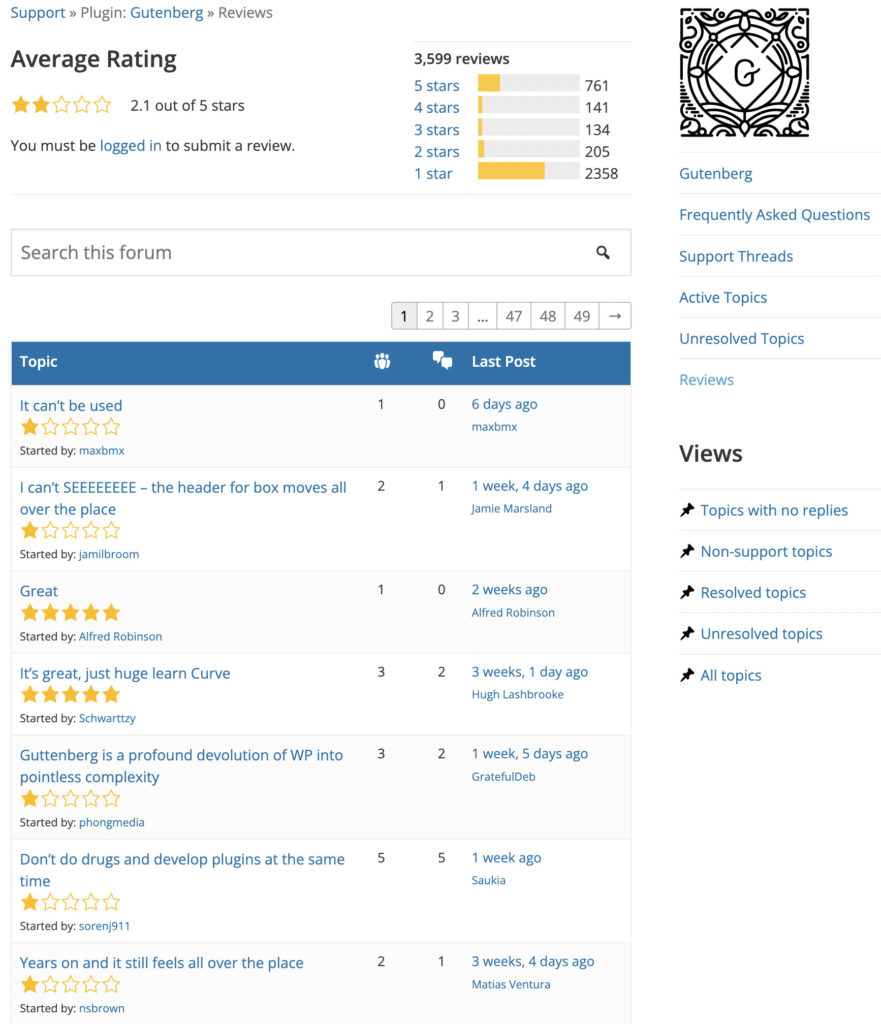
Status as of 22.11.2022
Disadvantages of the Gutenberg editor
Gutenberg supporters argue that the opposition to the new editor is mainly due to resistance to change, while the editor itself brings a breath of modernity and a perspective of development to WordPress. There may be a grain of truth in that, but undeniably, Gutenberg is not without its technical flaws.
-
Bugs and instability
Although the editor was presented as a stable version, looking at the issues and bugs discovered by users, one might feel that the label “stable” is somewhat premature. For us, as a company engaged in the daily administration of WordPress sites, this lack of polish is the first and biggest drawback of Gutenberg. Critical updates fixing serious security vulnerabilities appeared (fortunately) just a few days after the editor’s launch. However, this means that the decision to present it was made prematurely, and the entire project was not yet ready to see the light of day. Users’ experiences, complaining about slow performance, instability, interface “freezing”, and the editor consuming too much browser memory, confirm this theory.
-
Backward compatibility issues
Another frequently mentioned problem is that the Gutenberg editor is still not compatible with a wide range of popular plugins and themes, especially those that are no longer actively developed. Therefore, if your site uses older plugins or page builders, using Gutenberg might result in a long list of errors and a “breakdown” of the site. Adapting all available functionalities will certainly take time and require significant developer effort. Interestingly, some plugin publishers even advised against updating WordPress to a version with Gutenberg, as they did not have enough time to properly test the new solutions. And subsequent fixes, released in short intervals, did not improve the situation.
-
Not so simple
One of the main reasons for introducing Gutenberg was to make life easier for WordPress users. However, it turns out that using the new editor is not as intuitive as promised. Creating a post with it requires a lot of clicking and patience. Not everyone knows how to work with blocks (how to delete or modify them), and many options are simply missing. It also raises the question of who will train the users and who should be responsible for issues arising from the implementation of Gutenberg.
Advantages of the WordPress Gutenberg editor
For balance, it is worth mentioning a few advantages of the Gutenberg editor.
-
Clear appearance
It must be admitted that the new look of the WordPress editor is very neat and legible. The workspace is significantly larger than, for example, that of TinyMCE. As a result, Gutenberg allows for comfortable content creation even on small laptop screens, tablets, or even smartphones. The simplified view should also reduce distractions, which for many is a huge advantage.
-
Modification options
Ultimately, Gutenberg will offer a number of useful tools and options that previously could only be obtained by installing numerous plugins and extensions. We’re talking about the aforementioned drag and drop technique, the option to copy and share blocks, additional document information (character count, paragraphs), clickable headings that jump to specific parts of the content, and many other solutions which, if refined, will undoubtedly find fans. Gutenberg also provides the possibility of creating custom blocks. However, despite the tutorials available on the project’s official site, this option is not for everyone as it requires knowledge of JavaScript.
Gutenberg Editor – is it worth using?
In our opinion, the WordPress Gutenberg editor has great potential that its creators have not yet fully exploited. Several months after its official launch, the project still exhibits numerous shortcomings and bugs. Unfortunately, fixing the effects of these bugs is extremely tedious and time-consuming. We experienced it firsthand – WP Care has already performed dozens of such fixes.
There was also a lack of open communication regarding the purpose and justification for introducing the editor. Engaged users felt that the creators of Gutenberg did not take their opinions into account, which only fueled further resistance to change. It is therefore not surprising that the WordPress community is not overly enthusiastic about it. We are no exception. In our view, to avoid unforeseen breakdowns, it is better to use tools that have been thoroughly tested both by the creators and by the users themselves.
How to disable the Gutenberg editor in WordPress?
This is probably one of the most frequently asked questions we receive. There are several ways to disable Gutenberg. The simplest method is to install the Classic Editor plugin. Information about this plugin appears in the dashboard after updating WordPress to a new version. By clicking the available link and installing it, you get a tool that can completely replace Gutenberg with the classic editor or allow you to call it up in individual posts and pages.
- Alternatively, you can use the Disable Gutenberg plugin, which will disable the new editor entirely or for specific post types.
Please note that both methods will only be effective until the end of December 2021. At that point, the Classic Editor will no longer be officially supported by the WordPress team, and disabling plugins will cease to be useful. Gutenberg can also be disabled via PHP. Simply edit the functions.php file in your theme’s folder and add the following line of code: add_filter('use_block_editor_for_post', '__return_false');
This is a quick and effective method, but it requires a bit more technical know-how. Therefore, if you’re not confident in this regard, it’s best to have it handled by professional developers.



















































