



Plugins are a key element of the WordPress environment, enabling the expansion and customization of website functionality to meet individual needs. Removed plugins from the repository can cause numerous issues, including security risks and a lack of access to updates.
On the other hand, abandoned plugins by their authors pose risks related to long-term support and compatibility with the latest WordPress versions. In this article, we will take a closer look at this issue, discussing the reasons for removing plugins from the repository, the consequences of using them, and the risks associated with abandoned plugins.
Plugin – what is it?
In the context of content management systems (CMS) like WordPress, a plugin is an additional component that can be installed to extend the functionality of a website. Plugins allow users to customize their sites by adding new features, tools, or integrations with external services without modifying the core code.
Definition
A plugin can be defined as a component that can be easily installed and activated in a CMS to provide additional functions and services. Plugins are developed by any developer working with the language WordPress is built on. They are available for download or purchase from official repositories or plugin stores. Each plugin is designed to integrate with the core CMS system it is intended for.
Plugin removed from the repository
What is a repository and a removed plugin?
A repository in the context of content management systems like WordPress is an official, centralized database where various plugins are stored for download and installation. A removed plugin means it is no longer available for download and installation from the official repository of a given system.
Why are plugins removed from the WordPress.org repository?
Some reasons for removing plugins from WordPress are explained by moderator Mike Epstein. He mentions situations when:
- The plugin does not meet one or more WordPress requirements. There is even a blacklist created by one of the CMS authors, listing behaviors that inevitably lead to the removal of a plugin from the repository. This includes creating a plugin in an unethical or dishonest way to negatively impact other plugins or assigning it a license incompatible with WordPress.
- The author has requested the removal of their plugin – in this case, compliance with the developer’s request is necessary.
- The plugin contains a security vulnerability that makes its use unsafe.
- The plugin is not compliant with the General Public License v2 or later versions.
What are the consequences?
Removing a plugin from the repository can lead to many complications, both for website developers and users. Here are some potential consequences:
- Lack of updates: Users who have installed a removed plugin will not receive new versions, which may include bug fixes, improvements, or important security updates.
- Compatibility issues with CMS versions: As CMS systems evolve and are updated, older plugins may become incompatible with newer versions, leading to website issues.
- Necessary adjustments: If a removed plugin was a crucial part of a website’s functionality, its removal may require finding a replacement or adapting the site in another way.
Abandoned plugin
What is it?
An abandoned plugin means it is no longer being developed or updated by its creators. This can happen for various reasons, such as lack of time, interest, funding, or simply because the project is considered complete.
What are the consequences?
- Lack of security updates: One of the main consequences of an abandoned plugin is the absence of security updates. Any vulnerabilities discovered after the abandonment of the plugin will remain unpatched, making the site more vulnerable to attacks.
- Compatibility issues: Content management systems like WordPress are regularly updated. Abandoned plugins may not be compatible with newer versions of these systems, potentially causing errors or site crashes.
- No support: Users of abandoned plugins cannot expect support from the developers. If technical issues arise, users are left to solve them on their own.
- Decreased functionality: Plugins that are not updated may gradually lose functionality compared to newer, regularly updated alternatives.
- Legal issues: In some cases, abandoned plugins may contain outdated elements that do not comply with current legal requirements (e.g., data protection regulations).
How to check if a plugin is removed or abandoned?
While information about the need to update a plugin is easily disseminated via the WordPress Dashboard, the WordPress authors do not provide for a similar notification when a plugin is completely removed.
One of the available options is to check the links in the plugins section of the admin panel. The links will display details about the plugin in question. This can prove to be a lengthy process, as each plugin must be checked separately. The above method applies to free plugins distributed by WordPress.org. The screen below shows that the “details” option is not displayed for a deleted plugin.
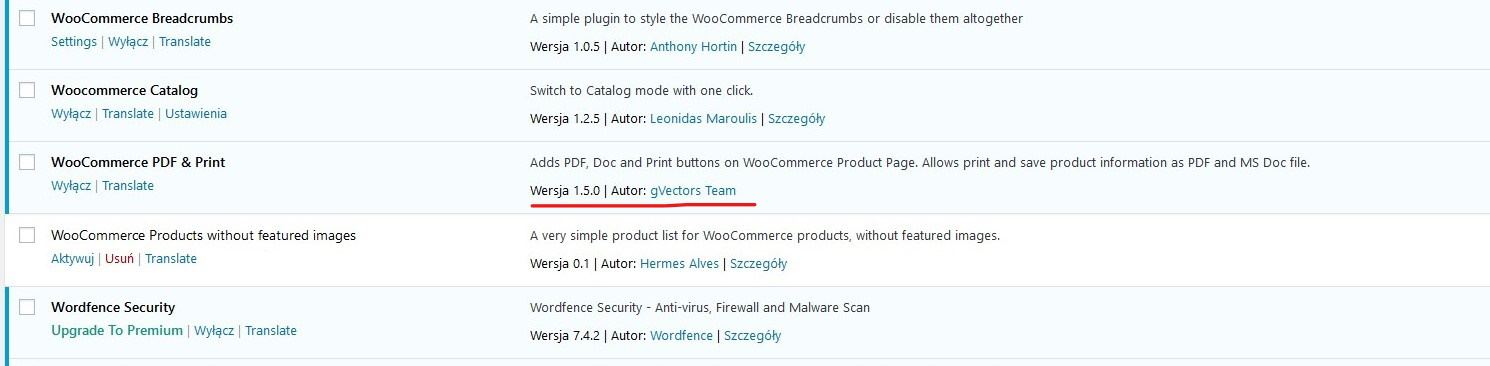
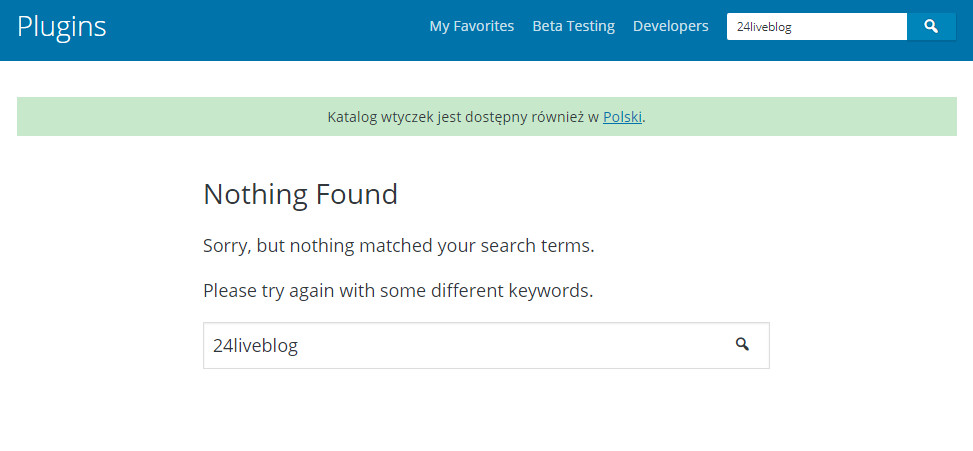
The link automatically takes you to the plugin’s official site or the plugin’s profile on wordpress.org. As of recently, WordPress has begun to change the appearance of sites whose plugins no longer exist or have been removed. Therefore, currently when you visit the above site, you should see the message “This plugin has been removed and is no longer available for download”. The “download” button will no longer be visible. Instead, the WordPress repository will display a “page not found” message.
How to report a problem with a plugin?
If you notice a plugin is not functioning properly or does not meet security standards, report it to WordPress as soon as possible so appropriate action can be taken. There are two recommended methods:
- Send an email to plugins@wordpress.org.
- Join WordPress.org and leave a comment in the #pluginreview channel.
A team of specialists will examine the plug-in and decide whether it can be repaired, removed or blocked altogether on WordPress.org
What to do if a plugin you use has been removed?
First, search for the plugin name in Google and check if there is an official reason for its removal. If it has a security vulnerability, remove it from your site immediately to protect it from potential attacks. If the removal is unrelated to security, evaluate whether the plugin is still essential for your site and look for an alternative.
Using an alternative plugin
If you do not want to use a plugin removed from the WordPress repository, you need to find an alternative to replace the old plugin.
Note that when implementing a new plugin, you may encounter some problems. One of the most common is the inability to use the WordPress theme you already have, after installing the new plugin. Another troublesome situation occurs when there is important data in the old plugin that you do not want to lose. Sometimes you may also find that the new plugin is not compatible with other plugins that have existed on the site for a long time.
A good solution to test replacements for a deleted plugin is to set up an intermediate site. If you find that it doesn’t work as expected, it won’t negatively affect your site’s performance in any way.
Summary
Plugins removed from the repository pose risks, as they may lead to security vulnerabilities, lack of updates, and compatibility issues. Similarly, abandoned plugins, which are no longer maintained by developers, can create security risks, functional limitations, and technical difficulties.
Are you using a plugin that has been removed or abandoned? Don’t worry, we can help! We offer not only WordPress-based website creation but also comprehensive technical support.
Contact us, and we will help you find the best solution!
Check our offer





















































