



It positively impacts user comfort, increases traffic, and supports SEO. Fast website performance has nothing but advantages! If you haven’t focused on this aspect of your site until now, it’s high time to change that.
Do you want to speed up your WordPress site and boost its performance? In this article, we will share the most useful tips for optimizing website speed.
Why is WordPress site speed optimization important?
In today’s technological world, time and user patience are worth their weight in gold. Rising standards mean that those who fall behind are at a disadvantage…
According to Google, your website should load in no more than 3 seconds. If it takes even a little longer, users will lose patience and interest in the site. After all, why wait for something when you can get it faster elsewhere?
But it’s not just people who love fast sites – Google appreciates them too! Performance is a factor that search engines consider when determining rankings. The faster your site operates, the higher the likelihood that you’ll secure that coveted spot at the top of the SERP. That’s why ensuring optimal speed for your WordPress site should be one of your top priorities!
Let’s take a closer look at these two aspects.
Page load speed is important for the user
Using a website can be compared to dining at a restaurant. Waiting too long for your food and slow service are unlikely to encourage you to return, right?
Slow loading times frustrate customers and can quickly lead to a drop in visits. If a site doesn’t load within a few seconds, users will likely just leave! This problem is especially well known to e-commerce business owners. Many studies confirm that a poorly optimized WooCommerce store is one of the main obstacles to increasing sales.
A website that loads in 1 second has a conversion rate 3 times higher than a site that takes 5 seconds.
Unfortunately, no company is immune to the effects of slow loading times, regardless of its size and popularity.
Did you know that…?
- BBC found that every additional second in page load time results in a 10% loss of all users.
- Amazon would lose 1.6 million customers if its website took 1 second longer to load!
- AliExpress recorded a 10.5% increase in orders and a 27% rise in conversion among new users after speeding up its site.
A fast WordPress site is important information for Google
For Google, the user comes first – and as we’ve established, slow load times cause dissatisfaction from the very start, creating negative impressions. Therefore, it is a priority to provide the user with the necessary information as quickly as possible. Consequently, in Google’s view, poorly performing sites do not deserve the same promotion in search results as much faster ones.
Additionally, Google’s crawling bots, which scour the internet to index pages, have a so-called crawl budget. This is especially important for large e-commerce sites that have a separate page for each product. The better optimized your WordPress site is (including its load time), the easier and faster Google’s bots can index your store. And that translates into better visibility and more profit for you.
Speeding up your WordPress site is also one of the key factors influencing Google Ads performance. According to Google’s official help page: “Higher quality ads can lead to lower prices and better ad positions”. A fast-loading site thus enables lower costs and improved effectiveness of advertising campaigns!
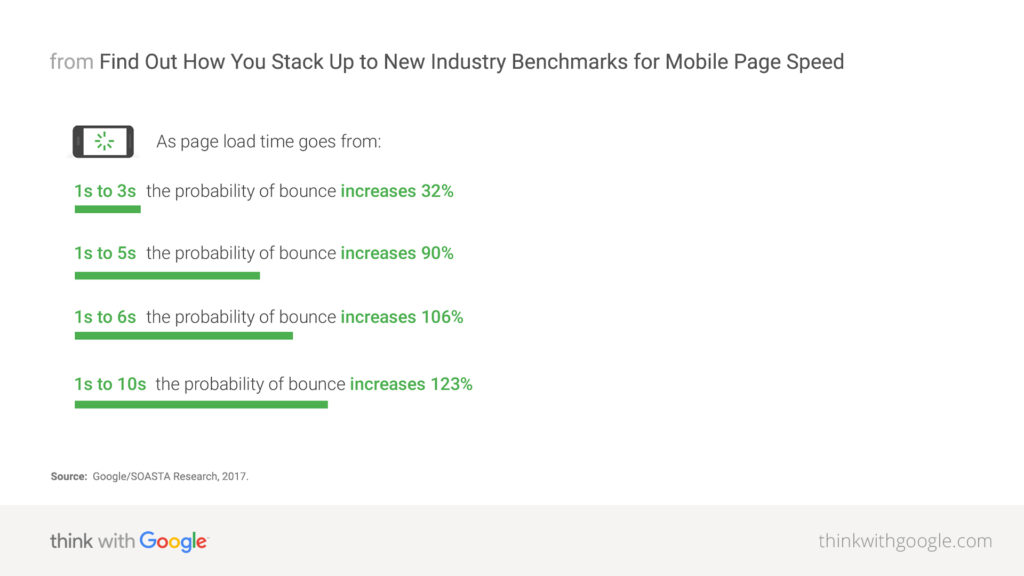
Google Study, 2017
How to check the speed of your WordPress website?
Testing your site’s performance is free and very simple. To do so, just enter your website’s URL into one of the many available tools designed to test speed and analyze web content.
Google PageSpeed Insights
One of the most popular tools for testing site speed is Google PageSpeed Insights. It is a user-friendly site focused on achieving high rankings, primarily in Google search.
Google PageSpeed Insights offers tests for both the desktop and mobile versions of your website.
Site speed test with GTmetrix
GTmetrix is an alternative to Google PageSpeed Insights, providing slightly different technical information that you can review. It may be useful if you are looking to optimize for search engines other than Google.
Speeding up your WordPress site – 8 most common areas for improvement
After entering your site’s URL into one of the above tools, you will receive a score for your site on a scale from 0 to 100. A good score is considered to be no less than 85 points.
A report will be generated where you can see which elements of your site are responsible for slowing down its load time. Based on that, you should make changes to help your site achieve a better score.
Your speed test report will likely include many recommendations for improvement. Some of these will be technical jargon that may be difficult for beginners to understand.
What steps should you usually take to better optimize your WordPress site’s speed?
-
Regular updates
WordPress is an open source project, which means that it is frequently updated. Each new version not only introduces new features but also fixes bugs and security vulnerabilities. Regular updates of the WordPress core, themes, and plugins are therefore a fundamental step to maintaining optimal site performance. Don’t forget them!
-
Image optimization
Images enhance the content on your site and make it more appealing to users. Unfortunately, if they are not properly optimized, they can do more harm than good… Oversized images are one of the most common causes of slow-loading WordPress sites. It is worth taking care of their proper optimization by reducing their resolution and file size. The best approach is to use lossless compression, which reduces the image size without compromising quality by removing unnecessary data.
-
Code optimization and compression
Minimizing and compressing code to the smallest possible size (without affecting its functionality) can significantly improve site speed. Reducing the size of HTML documents and CSS stylesheets decreases bandwidth usage and shortens the time needed to load the resources required for your site. There are two main types of compression you can use to speed up your WordPress site:
- Minification — a process that involves removing unnecessary comments, characters, and spaces from the source code. This results in a reduced file size of individual site components without losing functionality or aesthetics. It saves time on every page load because less code needs to be downloaded to display the page.
- GZIP — a form of lossless data compression for files transmitted from the server to the user’s computer. GZIP can reduce the size of HTML, CSS, and JavaScript files by up to 70%. The server compresses the data during transmission, and the browser decompresses (or “unzips”) it upon receipt.
To reduce the amount of unnecessary code on your site, you should also remove:
- unused plugins,
- unused themes,
- unnecessary code from active themes and plugins,
- unused widgets and shortcodes.
-
WordPress database optimization
Just like a car, your database needs regular maintenance, as it can become quite cluttered over time.
Optimization involves removing unwanted data, and remember, such data is also stored in your WordPress database. Examples include:
-
- unapproved or spam comments,
- post revisions and drafts,
- deleted posts and pages.
Cleaning your database of these elements will reduce its size and help hosting servers load your site’s content faster. You can do this using a dedicated plugin or manually through phpMyAdmin to remove items you no longer need.
-
-
Implementing cache, or temporary storage
Every time someone visits your site, WordPress must send a query to the server and database. Only after receiving a response is the site ready to be displayed. To avoid this process repeating every time, it is advisable to use caching. The site is then stored in the search engine’s cache. Because some of the files needed to load your site are already stored on the user’s computer, there is no need to wait for the server’s response on subsequent visits. This saves time and reduces server load.
To implement caching on your WordPress site, simply install and configure an appropriate plugin. We recommend WP Rocket.
-
Reducing Server Response Time (TTFB)
TTFB stands for Time to First Byte. It is the server response time measured from when the client sends a request to the web server until the first byte of data is received. Factors that have the greatest impact on how quickly a server responds include the quality of your hosting and web server (e.g., whether it has sufficient memory), as well as the PHP version and its execution speed.
-
Lazy Loading of offscreen images
If your WordPress site has many images, you can implement lazy loading. Instead of loading all images and videos at once, the content loads gradually. Only the images visible to the user on initial load are fetched and displayed, while the others load progressively as the user scrolls.
-
Avoiding heavy network loads
The problem of slow loading WordPress sites may also be due to simply having too much content or multimedia on your site. Long articles with many images or complex pages with dynamic elements will always require more time to process.
A solution might be to reduce visual effects on the site, display only excerpts with a “Read more” button, split long posts into several shorter ones, or implement pagination.
DIY WordPress speed optimization – what are the risks?
Optimizing your site can yield quick results if done correctly. However, if it is carried out by someone without sufficient knowledge, problems often arise that may result in, among other things, irreversible data loss…
Improper code optimization can lead to many issues – for example, elements on the site may display incorrectly or scripts responsible for forms or image sliders may malfunction. This could result in your site not functioning properly until specialists fix the errors. In short, poorly executed optimization can cause your WordPress site, instead of running faster, to become inaccessible to users!
Another problem to be aware of is the possibility of “over-optimizing” your site. WordPress specialists understand that some actions intended to speed up the site can generate errors elsewhere – for example, in JavaScript. Sometimes, the effort to speed up the site even slightly may not be worth the hassle. It is therefore important to know which elements are truly worth optimizing and which could have negative side effects on your site (e.g., reduced security).
WordPress optimization – there’s no time to waste!
Many factors affect site optimization. The most important include how your website is built, the number of plugins used, the site’s update status, the size of the media on it, and the server and its environment.
Not sure what exactly is slowing down your WordPress site? You don’t have to be! Our specialists, with their years of experience, can easily identify the causes of slow performance and implement effective optimization in the shortest possible time.





















































