



For many business owners, creating a professional website may seem like an unattainable luxury due to the high costs of hiring specialists or purchasing expensive tools and technologies. Fortunately, there are proven methods that allow you to build a high-quality website without straining your budget.
In this article, we present a simple and cost-effective way to create an attractive website using popular templates like Avada. With this guide, even those with little design experience can easily develop a website that serves as an effective communication tool with customers and helps achieve business goals. Discover the secrets of building an affordable yet professional website and step into online success!
Template
What is it?
Templates serve as the foundation for many websites, providing ready-made visual and functional solutions that can be customized to meet individual needs. A template, also known as a theme, is a collection of files that define various elements such as layouts, styles, fonts, colors, and functionalities. With a template, users can quickly and easily create a visually appealing and functionally designed website without requiring advanced programming knowledge.
Choosing a template
When selecting the right template, several factors should be considered, such as the purpose of the website, industry, visual preferences, and required functionalities. There are many platforms and online stores offering a wide selection of templates for different needs. It is also essential to check user reviews and ratings to ensure the quality and functionality of the chosen theme.
Avada template
Avada is one of the most popular and highly rated templates available on the market. Designed with flexibility and ease of customization in mind, Avada offers a rich library of pre-made layouts, graphic elements, and features that allow users to quickly create a unique website. Thanks to its advanced configuration options and intuitive user interface, even individuals without web design experience can easily customize Avada to suit their needs.
Avada is regularly updated and supported by its developers, ensuring compatibility with the latest WordPress versions and maintaining website security. These features have earned Avada the trust of millions of users worldwide, making it one of the top choices for creating professional websites.
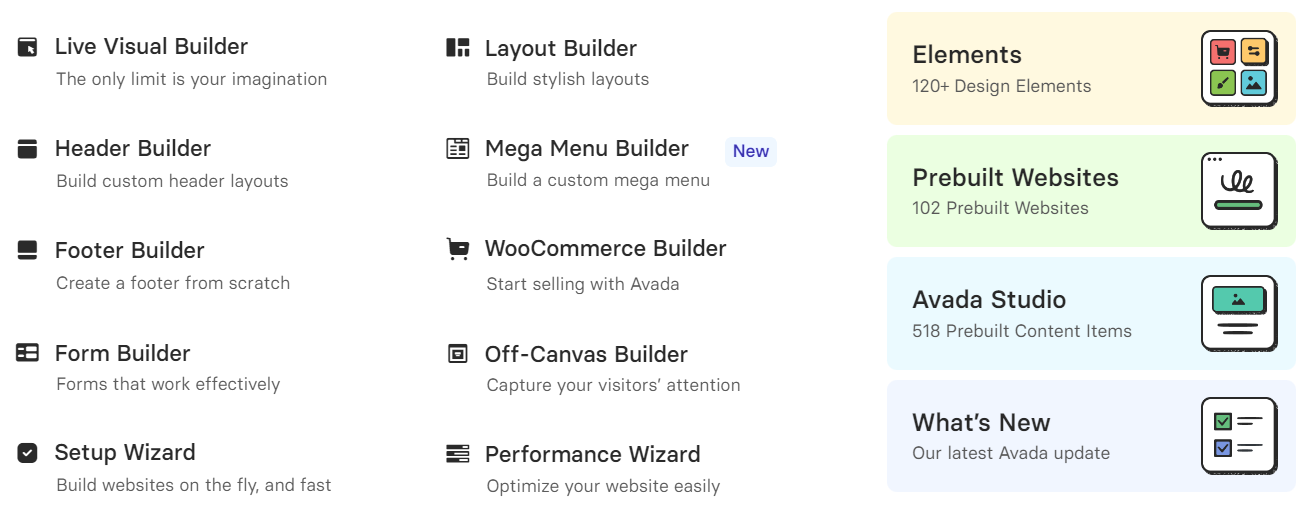
Avada’s built-in element library
Contact us.
Website plan
A well-structured plan allows for the effective organization of content and functions that will be presented to users. What elements should you consider when planning your website?
- Goal analysis: Define the primary goals of your website, such as showcasing products/services, building a brand, generating leads, or enabling online sales.
- Target audience identification: Identify your target audience and their needs. This will help tailor content and website functionalities to their expectations.
- Structure and navigation: Create a sitemap that outlines the main sections and subpages along with their hierarchy. Designing intuitive navigation will help users easily find the information they need.
- Content: Determine the key topics and content to be included on the site, ensuring essential messages and information are effectively communicated to users. Organizing content into sections will improve readability and comprehension.
- Visual design: Select colors, fonts, and graphic styles that align with your brand identity. Design a responsive layout that works well on different devices and screen sizes. Incorporate interactive elements such as buttons, contact forms, and animations to enhance user engagement.
Customizing the template
Once the plan is created, as outlined in the previous section, it must be implemented. This involves applying the planned aspects to the template. Follow these steps:
- Customize colors and styles: Navigate to the theme settings, where options for adjusting colors, fonts, and styles are usually available. Customize these elements to match your brand identity.
- Edit layout and structure: Use the theme configuration options to adjust the layout and structure of the website. Add, remove, or rearrange sections and content blocks to align with your needs and project goals.
- Add content and media: Input your own content, including text, headings, descriptions, and images. Incorporate graphics, photos, and multimedia to enrich the website and make it more engaging.
- Include interactive elements: Add interactive features such as call-to-action buttons, contact forms, Google Maps, and image galleries. Enable animations and effects to enhance user engagement and navigation.
- Configure navigation and menu: Adjust the navigation menu to reflect the website structure and facilitate easy movement across the site. Ensure the menu is clear and intuitive for users.
- Check responsiveness and compatibility: Verify that the theme is responsive and displays well on various devices and browsers. Test the website to ensure it functions correctly across all platforms.
Testing and optimization
After creating a website, a crucial step is testing and optimization. Conducting usability and responsiveness tests will help evaluate navigation ease and the site’s appearance on different devices. Additionally, testing load speed and optimizing SEO will enhance the site’s visibility in search results and improve the user experience. Regularly monitoring website traffic and analyzing data will help identify areas for improvement and allow for adjustments to meet evolving user needs and expectations.
Summary
Selecting the right website template is a key step in the web design process. Avada stands out as one of the best and simplest solutions due to its versatility, flexibility, and ease of customization for different needs and goals. With a vast library of pre-made layouts, graphic elements, and interactive features, creating a professional and visually appealing website is easier than ever.
Building a website doesn’t have to be expensive or complicated, especially when using the right template. Customizing the template, testing, optimizing, and keeping it regularly updated are crucial steps to ensure that the website not only looks professional but also effectively serves its business objectives.
We can create and maintain your website!
It’s important to remember that building a website is just the beginning of the journey. We understand that the website development process can sometimes be complex, requiring the integration of multiple elements. We can assist with each aspect individually or handle the entire process for you.
And if you already have a website and need a WordPress specialist to optimize its performance, security, add new features, and provide ongoing support – you’re in the right place! Our team of experienced professionals will ensure your website operates at peak performance.





















































