



A week ago, the latest update of the WooCommerce plugin was released. Upgrading from version 3.6.4 to 4.0 seems like a significant leap. It’s worth carefully analyzing the situation before eagerly enabling the update for your store. It’s often best to wait and let other users report any bugs before the necessary fixes are made. As reports suggest, there have been quite a few issues already.
One concerning factor is the long list of plugins that have not yet been tested for compatibility with WooCommerce 4.0. After running a series of tests, WP Care specialists have decided to hold off on updating WooCommerce on our clients’ websites until it is fully safe to do so.
Until these improvements are implemented, it’s good to take a closer look at what we can expect from the new version.

Changes in WooCommerce Admin – new interface
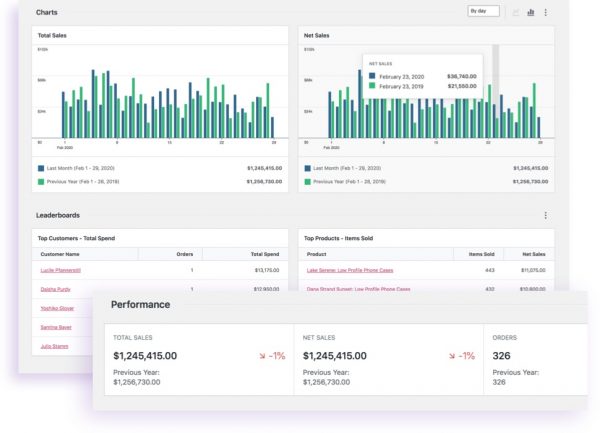
The first major update in WooCommerce 4.0 is the WooCommerce Admin interface. This new dashboard isn’t a complete surprise, as users of version 3.6.4 could already test it as a separate feature plugin. Now, in version 4.0, it has been integrated into the core, and—unsurprisingly—it hasn’t been well received. The ratings are rather low, but this may just be a matter of adjusting to the new layout.
Fortunately, the new WooCommerce Admin can be disabled, which will be useful for users who do not need advanced analytics on a daily basis, and where the applied AJAX may burden their hardware capabilities.
New notification system – or lack of one…
Another concern for users is the promised but ultimately missing notification system in version 4.0. Currently, notifications are quite unclear, especially when multiple plugins are installed, making it easy to get lost in the flood of messages from various sources. However, a new core WordPress update is expected soon, aiming to streamline the notification system.
New setup wizard, order view, and system status information
Interestingly, a new setup wizard will be available for a randomly selected half of new WooCommerce users. This update has received positive feedback for its clarity and user-friendly approach to setting up a store.
Overall, simplicity and transparency have been the focus in this new version. One example of this improvement is the order summary, where individual gross and net amounts are now displayed separately. Additionally, variations are saved more efficiently, and more system status information has been added.
Should You update WooCommerce?
Aside from compatibility issues with many plugins, the new version introduces new phrases that are not yet translated into Polish. If you feel up to the challenge and would like to help, you can support the WooCommerce translation community here. However, if you prefer to run your e-commerce business without issues, it’s best to wait for a refined version before updating.
Updated WooCommerce and need help?
If you decided to update your WooCommerce plugin to the latest version, but things didn’t go as planned – contact us! Our team of specialists will analyze the issue and quickly fix any errors, so you can continue running your store smoothly.




